Why safety starts before the stand is switched on
A rotating display stand should be treated like any other powered shop fitting. Before installation, check the floor finish, available space, nearby foot traffic and whether the unit will sit close to an entrance, till point or promotional aisle. In busy stores in Johannesburg and Pretoria, a stand that looks fine on paper can become a trip risk once trolleys, baskets and school traffic come past it.
The safest installations begin with the basics: level flooring, enough clearance for rotation and clear visibility from all approach angles. If the stand is going into a mall in Sandton or a roadside retail site in Durban, the installation plan should also consider cleaning routines, security patrols and after-hours access. A unit that is stable on day one must stay stable after months of movement, cleaning and customer contact.
Getting the base, load and footprint right
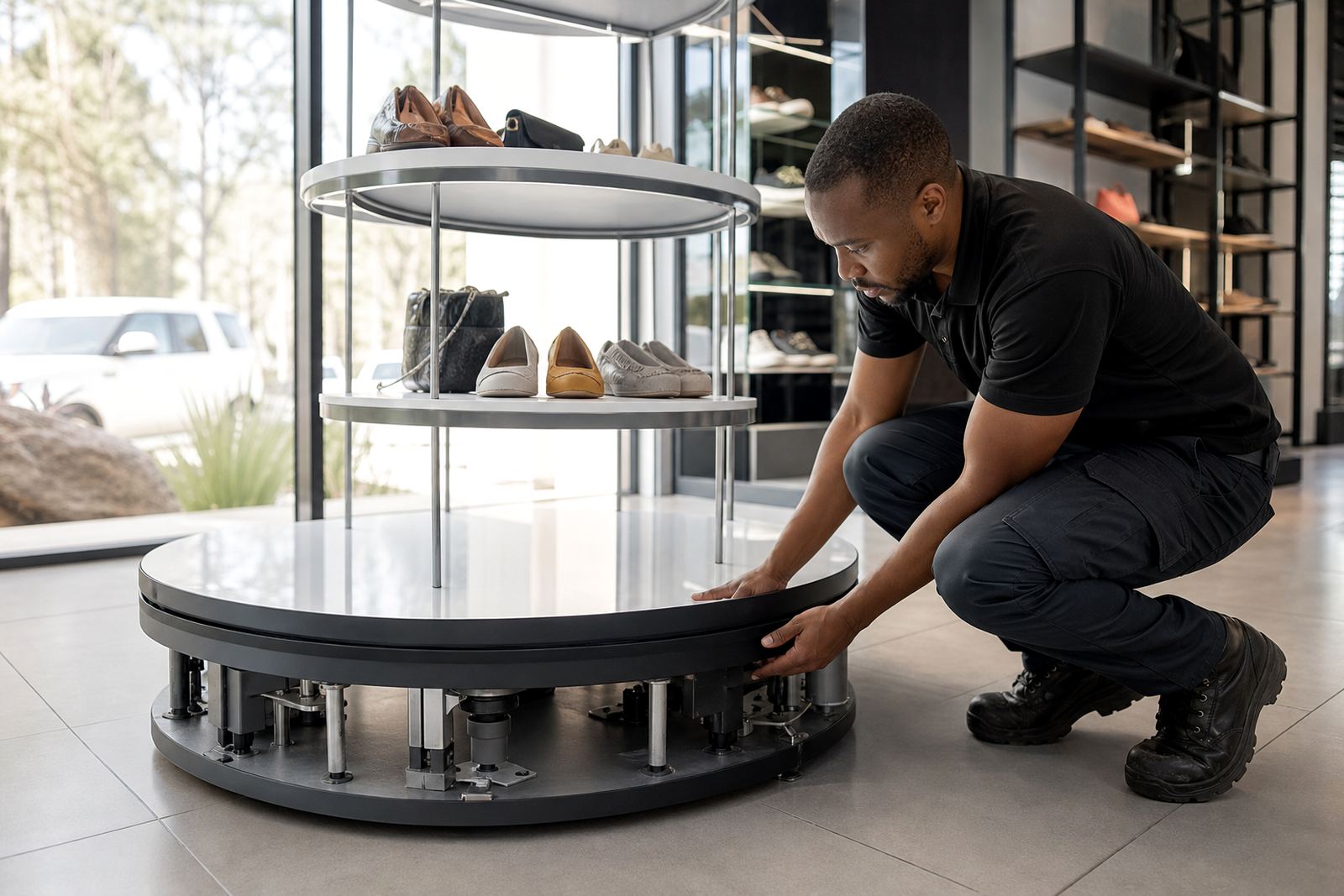
The base does most of the safety work, so the footprint must suit the product weight and height. A tall stand with a narrow base can tip if the load is uneven or if shoppers lean on it. For heavier items, the centre of gravity should stay low and the turntable or display head must be matched to the load limit. This is where proper site assessment saves trouble later.
- Keep the heaviest stock closest to the centre of the unit.
- Do not exceed the recommended weight or size per shelf or hook.
- Leave enough floor space for the full rotation path, including cables.
- Use a base that suits the store surface, whether tile, sealed concrete or vinyl.
In a Cape Town store with polished flooring, even a small wobble can become noticeable, especially where customers walk past in a hurry. In coastal areas, salt air and humidity can also affect fixings and moving parts, so the base and hardware should be checked more often than inland sites.
Power, cabling and load-shedding preparation
Motorised retail displays depend on reliable power, but South African stores know that supply is not always steady. Cable routing must be neat, protected and out of the customer path, with no loose ends under the stand or across an aisle. If the unit needs a backup plan for load-shedding, the solution should be planned from the start rather than added later.
Good practice is to place the power supply where staff can reach it without bending behind the display or lifting stock. Where a retailer uses battery support, timer controls or networked content, the electrical layout should be set up so that a power cut does not cause sudden movement or data loss. One retailer in Midrand lost a full promotion weekend because a display restarted unsafely after repeated outages, so the fix was not just more power, it was proper configuration and safe recovery settings.
- Keep cables short, protected and clearly labelled.
- Use surge protection where electrical fluctuations are common.
- Test restart behaviour after a power interruption.
- Make sure any backup supply is ventilated and kept off the floor.
Keeping shoppers away from pinch points and moving edges
Rotating equipment creates pinch points, even when the movement looks slow. Staff should know where fingers, loose clothing and shopping bags can catch, particularly near joints, drive mechanisms and display edges. Clear spacing and visible warning labels help, but the real protection is good placement and sensible product choice.
Where the stand is used for cosmetics, accessories, small electronics or packaged items, the display should be set so that customers can view stock without reaching into moving parts. In stores with children nearby, such as family retail spaces in Bloemfontein or Durban, the unit should not sit at child eye level if the moving section is exposed. If the display has lighting or screens, those parts should also be mounted so that heat and glare do not create a second hazard.
Staff training matters here. If team members know how to stop the stand quickly, how to reset it after an alarm and when to call for support, the risk drops immediately. That is especially important in stores with rotating promotions and frequent stock changes, where staff may be tempted to make quick adjustments without switching the unit off first.
Cleaning, maintenance and daily checks that actually prevent trouble
Most safety issues do not start with a big failure. They begin with dust, loose fixings, worn bearings or a stand that was bumped by a trolley weeks earlier. A daily visual check and a proper servicing plan can prevent the kind of fault that stops trading in the middle of a peak period.
A practical maintenance routine should include inspection of the base, fasteners, motor housing, cables and display attachments. In high-traffic sites, a weekly check is often not enough. If the store is near the coast, or if the area carries fine dust from nearby roads or construction, the unit may need more frequent cleaning and tightening. Replace damaged parts early rather than waiting for the next service visit, because a loose section can shift weight and create imbalance.
- Check for wobble before opening and after closing.
- Wipe dust from moving parts without forcing the mechanism.
- Record any noise changes, jerking or uneven rotation.
- Keep a log of repairs, part swaps and service dates.
What retailers in Gauteng can learn from a busy store fit-out
A Sandton fashion store wanted a rotating feature stand for gift sets and accessories, but the first site walk showed a problem. The chosen position was close to the entrance, on a slight slope, with regular trolley movement from the neighbouring shop. The safer option was to move the display further inside, fit a wider base and add a controlled start-stop setting so the unit did not begin moving while customers were stepping around it. The result was a cleaner layout and far fewer staff interventions.
That kind of practical adjustment is common across South Africa. A safe rotating stand is not only about the equipment itself, it is about the floor, the traffic flow, the climate and the way staff use the unit every day. When the installation is matched to the site, the display does its job without creating extra work for the team.
A simple safety checklist for store teams
Before opening, during trading and after closing, the following checks help keep motorised displays under control:
- Confirm the stand is level and stable.
- Check that the load is centred and within limits.
- Make sure cables are secure and not exposed to foot traffic.
- Test the start and stop function before customers arrive.
- Watch for unusual noise, speed changes or vibration.
- Keep the area around the display clear of boxes, baskets and cleaning gear.
If a retailer uses rotating product stands across multiple branches, a standard checklist helps every site work the same way. That makes training easier, keeps repairs down and helps teams spot a problem before it becomes a shutdown.