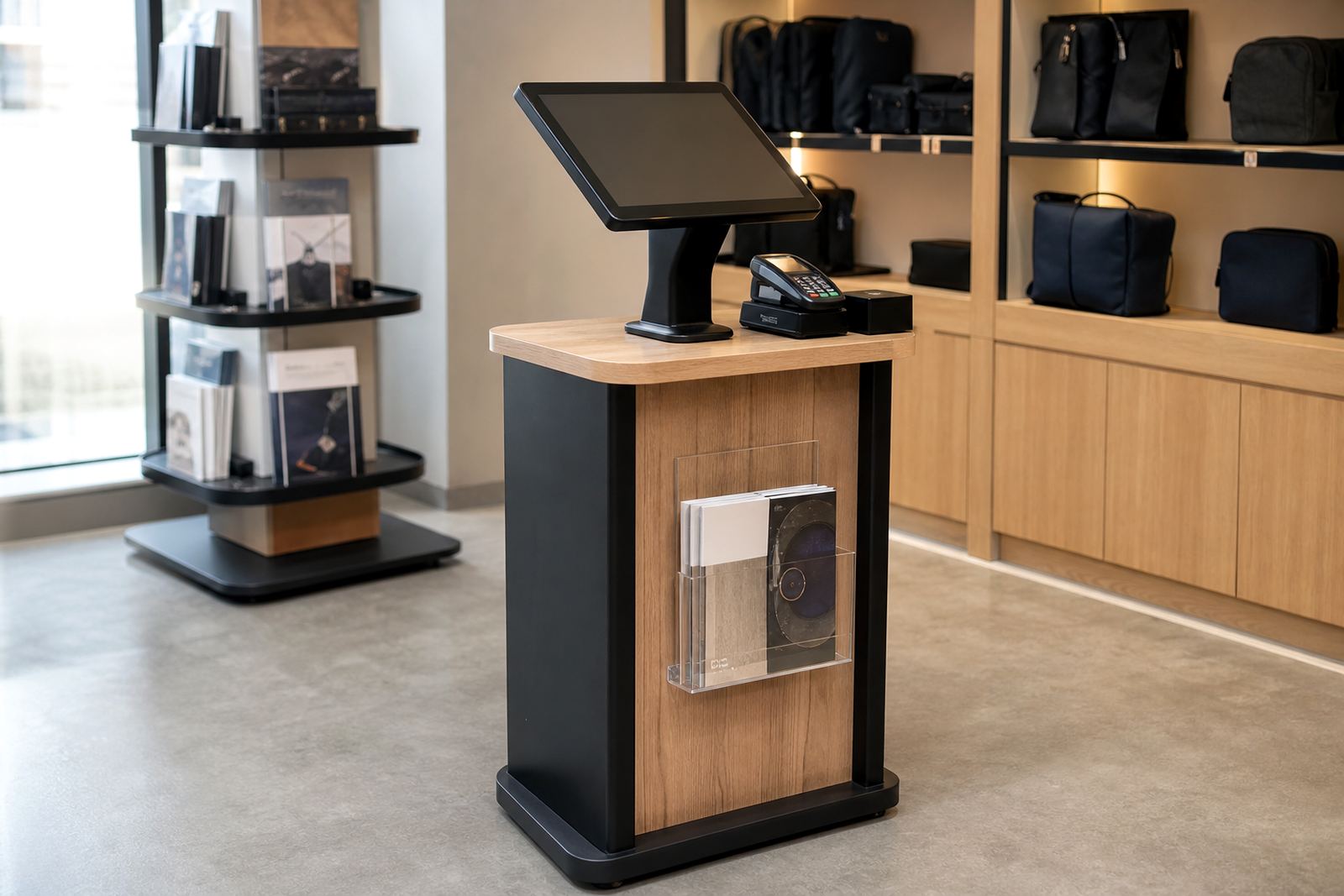
What a tablet kiosk stand does in-store
A tablet kiosk stand is a floor or counter mounted holder that keeps a tablet fixed in place while customers interact with it. It is suited to short tasks such as loyalty sign-ups, quick surveys, stock checks, appointment bookings and product lookups. In a retail setting, the stand has to be stable, easy to clean and simple for staff to manage during a busy day.
Our tablet kiosk stand range is made for South African retail floors where traffic is constant and conditions are not always ideal. In shopping centres, forecourts and independent stores, the stand helps keep the interaction point organised. It also reduces the risk of tablets being moved around, dropped or carried off between shifts.
For stores in Johannesburg, Pretoria, Cape Town, Durban and Bloemfontein, the main benefit is control. You decide where the screen sits, how the cable runs, and whether the unit is fixed to a counter or mounted as a freestanding point of use display.
Sizes, mounting options and finish choices
The stand is usually specified around the tablet size and the way customers will approach it. Smaller 10 inch tablets suit compact counters and sign-up points, while 12.9 inch units work well where there is room for clearer prompts and bigger touch targets. The frame can be set for portrait or landscape use, depending on the content layout.
Available options normally include counter top bases, freestanding floor posts, wall mounting and lockable enclosures. For stores with limited space, a counter mount keeps the footprint tight. Where you need stronger visibility, a floor stand places the tablet at standing height and makes it easier for more than one shopper to see the screen.
Finishes can be matched to the store interior, with powder coated metal, brushed metal detail or neutral colours that sit well beside shelving and point of sale counters. In coastal areas such as Durban and Cape Town, the finish should cope with humidity and regular cleaning. In dry inland stores, dust control and stable cable routing become more important.
- 10 inch, 11 inch and 12.9 inch tablet support
- Portrait or landscape orientation
- Counter top, wall mount or freestanding base
- Lockable access to the tablet compartment
- Powder coated metal or neutral retail finishes
Where this stand suits best
This product is a good fit for sign-up points, reception counters, seasonal promotions and self-service corners. It is not intended for heavy public computing or long form work sessions. Instead, it handles lighter interaction where the customer only needs a few steps to complete a task.
Many retailers use it for loyalty registration, customer feedback and simple product selection. It also suits pharmacy counters, showroom entrances, service counters and queue management areas. In stores where staff are helping several customers at once, a tablet kiosk stand can take pressure off the team by handling repetitive questions or short forms.
It works well where floor space is limited and there is no need for a full kiosk cabinet. If your site has frequent load shedding or unstable power, the stand can still be used with a tablet that has enough battery backup, though a proper charging plan is still important. For stores using networked content, plan for a stable Wi-Fi signal or a hardwired connection nearby.
- Retail sign-up and loyalty enrolment points
- Quick surveys and feedback collection
- Service counters and reception areas
- Product browsing and short information lookups
- Seasonal promotions and in-store campaigns
Installation, cable routing and power planning
Installation starts with checking where the stand will sit, how customers will approach it and where the cable will run. A neat install matters because exposed cables create trip risks and make the area harder to clean. Where possible, the stand should be close to a power source and away from trolley paths, doorway swings or fire exits.
The unit itself does not need gas, only power for the tablet and any connected accessories such as a small printer or router. If the tablet is only used for light interaction, a standard mains socket is usually enough. In more active sites, a backup power solution or UPS can help keep the unit online during brief outages and brownouts. Network integration may be needed if the kiosk must send data to a back office system or cloud form.
For fixed stores, our team can handle delivery installation, software configuration and network integration. In Gauteng sites such as Midrand, Sandton, Centurion and Pretoria, this is often arranged during trading hours with care taken around customers and stock movement. The stand should always be installed level, anchored correctly and checked before handover.
Care, servicing and everyday use
A tablet kiosk stand is straightforward to maintain if it is cleaned regularly and checked for loose fittings. Use a soft cloth and a mild cleaner, especially on the tablet face and high touch areas around the frame. Avoid harsh chemicals that can mark the finish or damage the screen surface. In dusty areas, weekly cleaning is often enough, while busier stores may need more frequent wipe downs.
The main service items are the locking mechanism, cable condition, screen mount and power lead. If the stand is moved often, check the base bolts and any internal fasteners at least once a month. A preventative servicing plan helps catch wear before it becomes a downtime issue, which is useful in stores that run promotions or weekly campaigns.
Where public use is high, staff training makes a difference. A quick handover on locking, rebooting, cleaning and basic fault checks keeps the unit in better shape. Our support team can assist with fault repairs, parts replacement and support retainers for retailers that want predictable upkeep.
- Clean with a soft cloth and mild cleaner only
- Check locks, bolts and cable strain points regularly
- Keep firmware, apps and content up to date
- Plan servicing before peak trading periods
- Train floor staff on daily use and reset steps
What to check before you order
Before ordering, confirm the tablet size, the mounting style and where the unit will be used. A stand that looks suitable on paper may still be wrong if the counter is too narrow, the cable route is awkward or the screen needs to face a queue from a specific angle. Measure the available footprint carefully and allow space for shoppers to stand comfortably.
You should also decide whether you need a lockable enclosure, a branded wrap or a plain neutral finish. If the stand will be used for sign-ups, make sure the screen height works for standing users and that the buttons are large enough for quick entry. If staff will need to remove the tablet, ask how the locking system works and whether spare keys are included.
It is worth checking the content flow too. Simple tasks work best on a tablet kiosk stand, so the screens should be short and clear. If your project needs more advanced customer engagement, a larger kiosk or a more detailed interactive solution may be a better fit. Our retail solutions consultant can help you compare options and choose the right setup for your store plan.
- Tablet size and orientation
- Counter, wall or floor mounting
- Locking access and spare keys
- Cable route and power point location
- Branding, finish and screen height
- Content type and user journey
Key facts
| Supported tablet sizes | 10 inch, 11 inch and 12.9 inch units |
|---|---|
| Orientation | Portrait or landscape |
| Mounting types | Counter top, wall mounted or freestanding |
| Power | Standard mains power for tablet charging and any linked devices |
| Security | Lockable enclosure with controlled access |
| Typical use | Sign-up points, surveys, product lookups and lightweight interaction |