What the Electronics 360 Stand does in-store
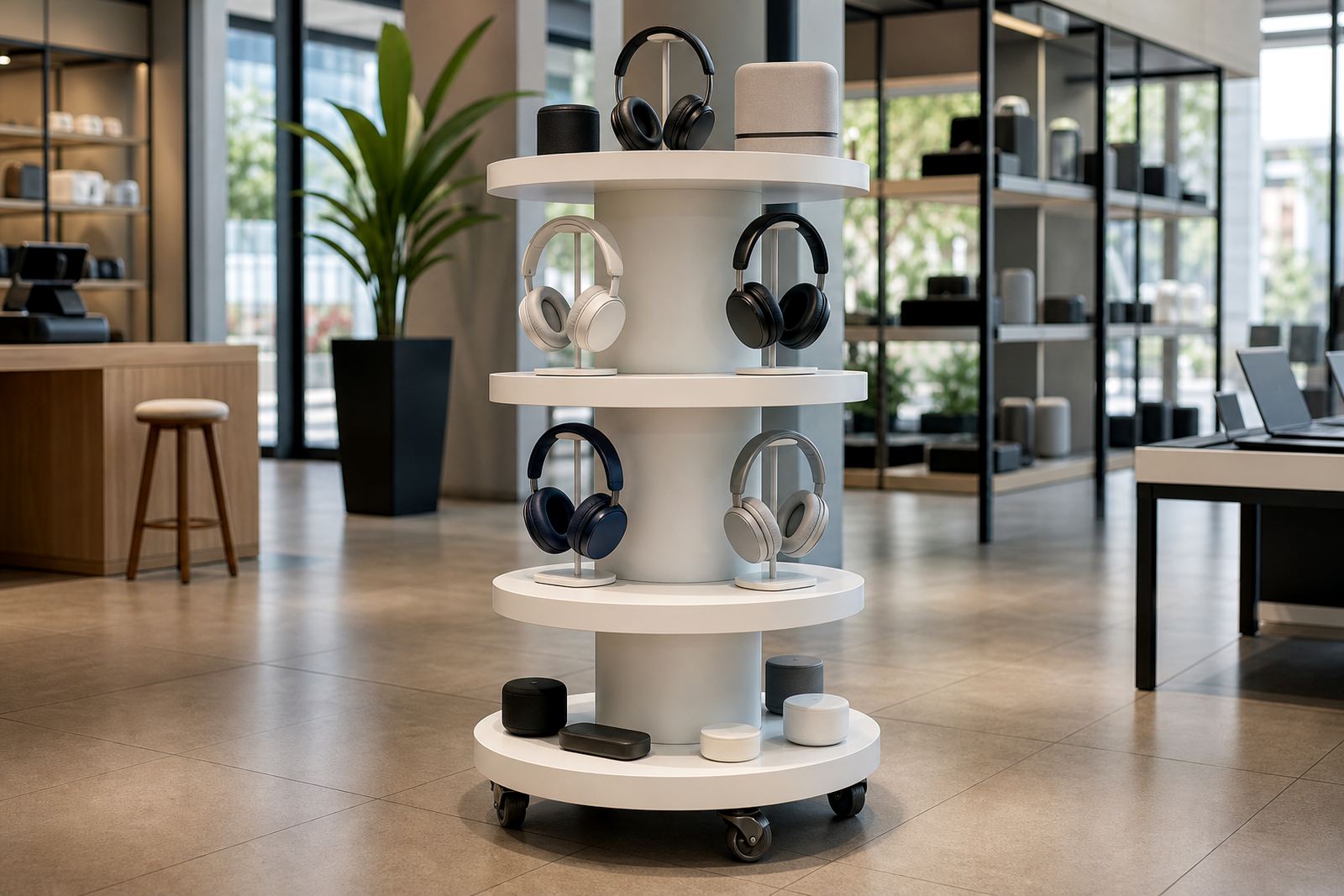
The Electronics 360 Stand is built for retail floors where customers want to compare features quickly and handle products without creating clutter. It gives a 360-degree view of packaged electronics, demo units and accessory bundles, so the item can do the selling while your staff spend less time lifting stock off shelves.
This stand suits stores that need a clear, organised way to present higher-value items such as headphones, smart accessories, compact speakers, gaming accessories and small boxed electronics. The rotating format works well in walkways, promo bays and near tills where people already pause. In practice, it helps turn a small footprint into a useful sales point, which matters when floor space is tight and rental rates are high.
Because the display can be configured for different weights and product sizes, it is a practical choice for shops that refresh ranges often. You can use it for launches, seasonal promotions or permanent product presentation. It also supports cleaner merchandising in stores where dusty air, aircon and load-shedding can affect how product displays are maintained.
Sizes, finish options and display formats
We supply the Electronics 360 Stand in several heights and tray layouts, depending on the product weight and how much stock you want to show at one time. For smaller boxed items, a compact floor stand is often enough. For larger electronics or bundled ranges, a taller format with wider trays gives better visibility and easier access for staff.
- Compact stand for light boxed products and accessories
- Mid-height stand for headphones, gadgets and small tech bundles
- Heavy-duty option for higher load applications and frequent rotation
- Powder-coated frame finishes for indoor retail use
- Clear branding panels for pricing, product callouts and QR content
- Custom tray spacing to suit different carton sizes
Finish options are chosen with retail conditions in mind. In inland stores, the main concern is dust and handling wear. In coastal areas such as Durban and Cape Town, humidity and salty air can shorten the life of poor quality metalwork, so the frame and fasteners need proper protection. If your store looks after premium stock, a cleaner branded finish can help the display sit comfortably with the rest of the shopfitting.
Where the stand suits best in South African retail
This product works well in electronics stores, department stores, forecourt convenience retail, cellular accessory shops, airport retail and lifestyle outlets that want a neat product focus. It is also useful for stores in malls where security and floor layout matter, because the rotating format keeps products visible without needing a large island display.
In Johannesburg and Sandton, it is often used for premium add-on sales near the till or in mobile accessory sections. In Pretoria and Centurion, it suits structured retail layouts where clear category signage helps customers move fast. In Cape Town and Durban, the stand is a practical fit for busier stores that need durable, easy-clean fixtures. In Bloemfontein, it works well where stock presentation needs to stay tidy through long trading hours and changing foot traffic.
If your store has more than one branch, the stand can be set up in a consistent way across all sites. That helps with staff training and makes product placement easier to manage when promotions change from one region to the next.
Installation, power requirements and site checks
The Electronics 360 Stand is straightforward to install, but the site still needs to be checked properly before delivery. A level floor surface is important, especially if the stand will sit near doors, polished tiles or heavy customer traffic. If the unit includes lighting, motion features or a digital component, the power point location must be planned before installation so there are no loose leads across the floor.
- Allow enough space for rotation and customer access
- Check floor loading if the stand will carry heavier products
- Confirm plug point position for any powered features
- Keep the unit away from direct water spray and cleaning splash zones
- Use cable routing that complies with store safety rules
No gas connection is required. For stores with limited backup power, it is worth considering how the display will perform during load-shedding. If the stand has lighting or moving parts, a basic power backup plan can help keep it presentable through trading interruptions. Our team in Midrand can assess the site, advise on layout and arrange installation across Gauteng and other major metros.
Care, servicing and daily handling
This stand is made for regular retail use, but it still needs simple care to stay presentable. Wipe the frame and trays with a soft cloth, use mild cleaning products and avoid harsh chemicals that can damage coatings or printed branding. If the display carries boxed tech products, keep an eye on carton edges and corners so the presentation stays neat rather than looking tired.
For busy stores, planned servicing is a practical choice. We can help with preventative servicing, fault repairs, parts replacement and support retainers where needed. That is useful when a display is moved often, reloaded daily or used in a store that gets a lot of customer contact. If a tray or bracket loosens over time, it should be tightened straight away to avoid damage to stock or the stand itself.
Training staff to rotate and restock the unit correctly also makes a difference. A simple loading routine prevents uneven wear and helps the stand last longer. It also cuts down on small issues that build up over time, especially where different teams handle the same display on different shifts.
What to confirm before you order
Before ordering, it helps to check the products you want to display, the weight of each item and the amount of stock that should be on the stand at once. That will determine the frame size, tray format and whether you need a standard or heavy-duty setup. If you want branding, decide early on what text, colours and product messages must appear on the panels.
- Product dimensions and total loaded weight
- Desired stand height and footprint
- Number of display faces or trays needed
- Whether the unit needs lighting or power
- Branding content, pricing labels and any QR prompts
- Delivery site, access route and installation window
It is also worth checking the store layout before final sign-off. Narrow aisles, glass fronts, tills and security gates all affect placement. A good site check saves time later and avoids a stand being delivered to a spot where it cannot rotate properly or where customers cannot reach it comfortably.
Key facts
| Product type | Rotating retail display stand for electronics and boxed tech products |
|---|---|
| Typical use | Headphones, gadgets, accessories and small boxed items |
| Construction | Steel frame with retail-grade rotating base |
| Finish | Powder-coated indoor finish with optional branded panels |
| Load range | Configured by model for light to heavy retail stock |
| Power need | Manual version needs no power; optional powered features require standard store electricity |